Using Corpus Actions
Corpus Actions automate processing when specific events occur in a corpus. You can configure three types of actions:
- Fieldset-based Extractions - Extract structured data using fieldsets
- Analyzer-based Analyses - Run classification or annotation analyzers
- Agent-based Actions - Invoke AI agents with pre-authorized tools
Tip: Agent-based actions can now delegate to fieldset extracts and analyzer runs through the
start_extract/start_analysistools (see LLM tools docs). This lets a single agent action read a new document, decide what it is, and then queue the appropriate configured extract — without having to hard-code one specific Fieldset on the action itself. Add the tools to the action'spre_authorized_tools(e.g.["start_extract"]) to skip approval prompts in the automation path.
Trigger Types
| Trigger | Event | Supported Actions |
|---|---|---|
add_document | Document added to corpus | Fieldset, Analyzer, Agent |
edit_document | Document edited in corpus | Fieldset, Analyzer, Agent |
new_thread | Discussion thread created | Agent only |
new_message | Message posted to thread | Agent only |
Note: Thread and message triggers are designed for AI-powered moderation workflows. See the walkthrough guide for detailed examples.
Important: Deferred Execution
Corpus actions automatically wait for documents to be fully processed (parsed, thumbnailed) before executing. This ensures that agent tools like load_document_text have access to complete document content.
- New uploads: Actions trigger after parsing completes
- Existing documents: Actions trigger immediately when added to corpus
Via the GUI
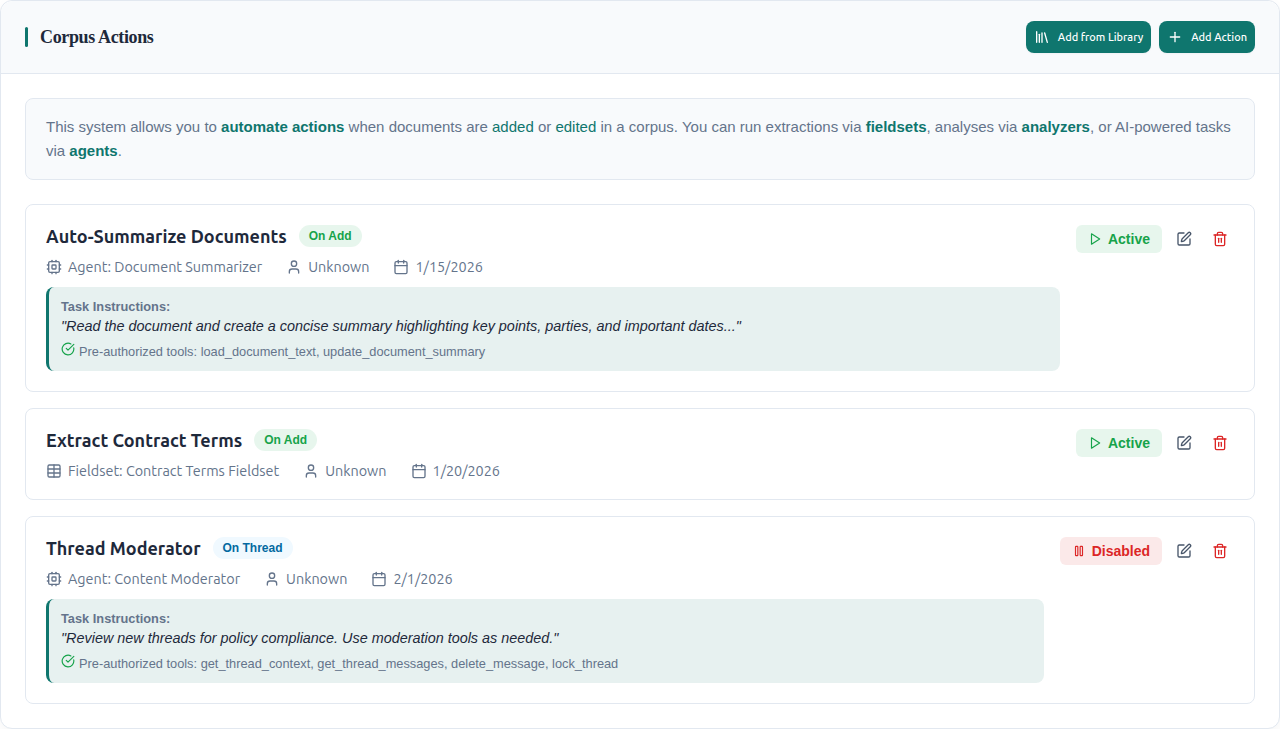
For Corpuses you own, you can go to the Corpus settings tab and view configured actions or configure new actions.
Action List View
The settings tab shows all configured actions with their type, trigger, status, and task instructions:
Creating a New Action
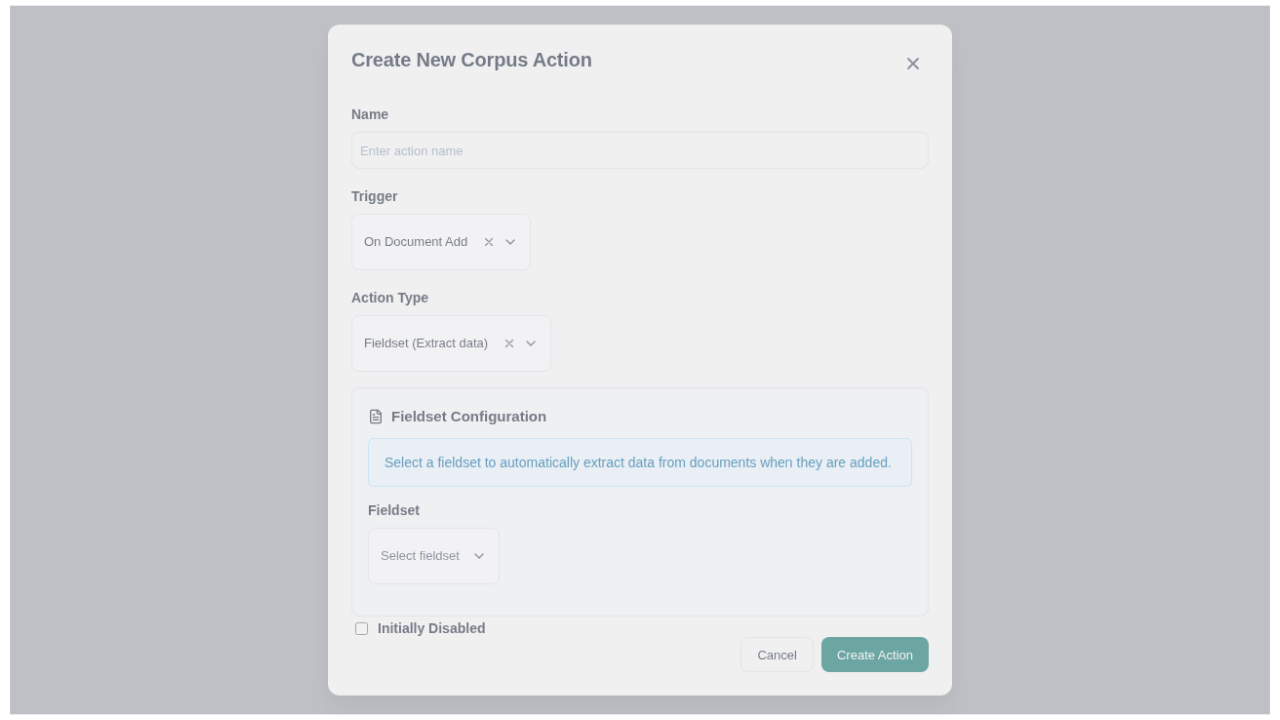
Click Add Action to open the creation modal. The default view shows fieldset configuration:
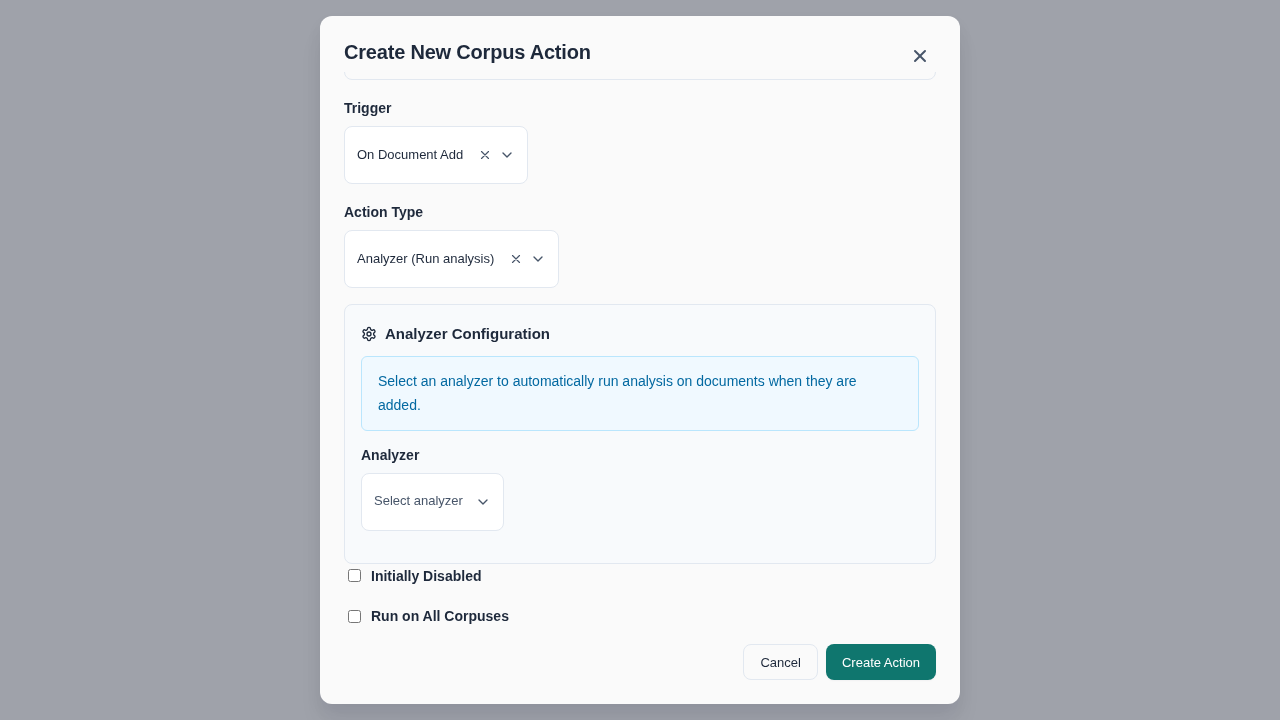
Switch to Analyzer for classification actions:
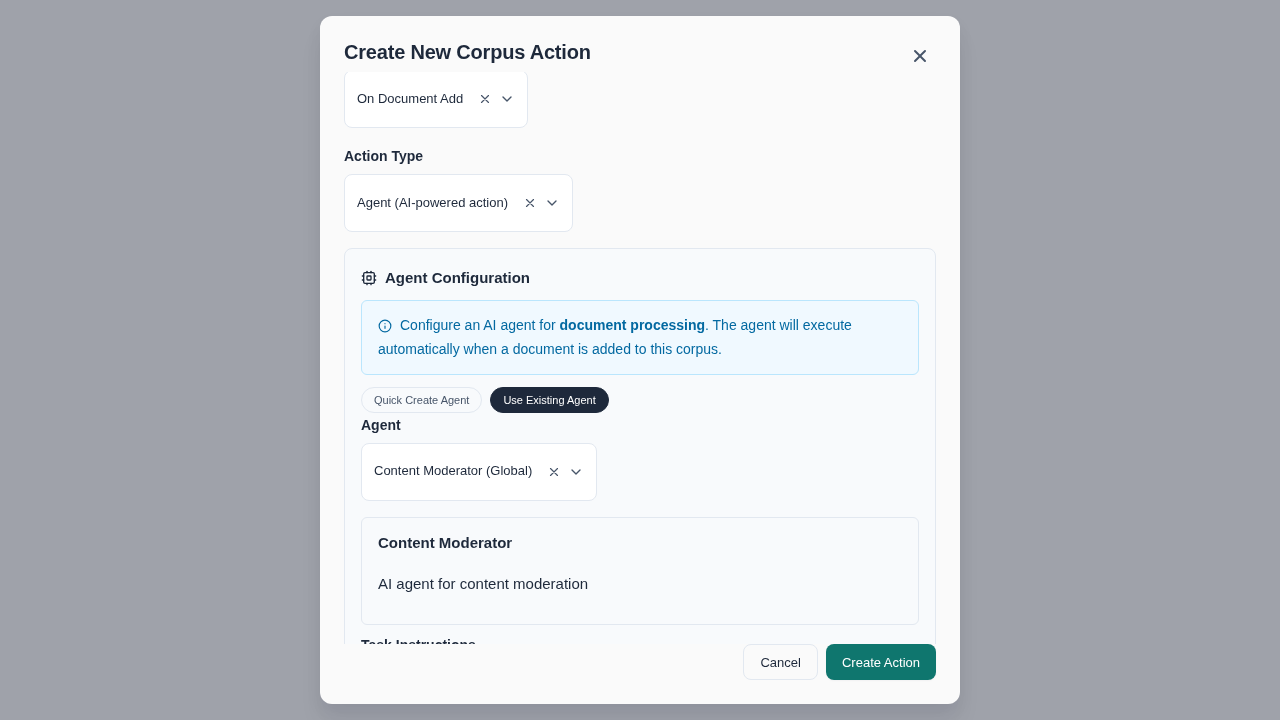
Switch to Agent for AI-powered actions with pre-authorized tools:
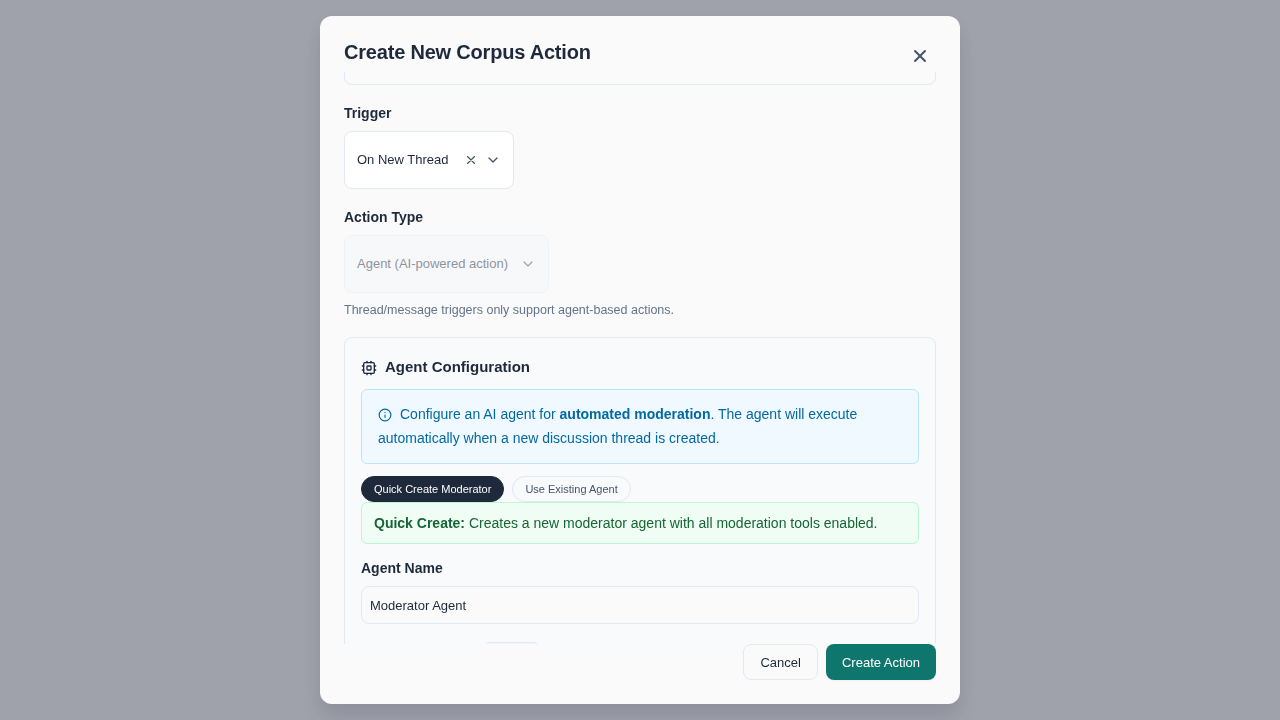
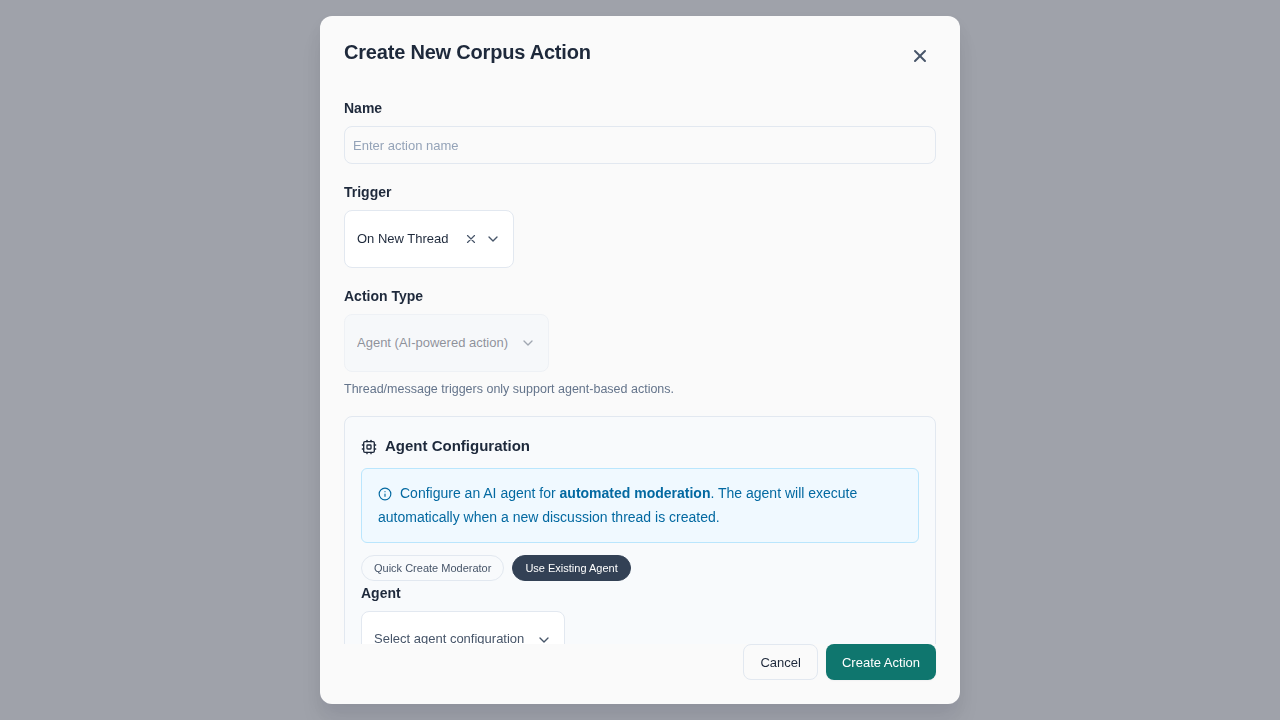
Thread Moderation Actions
For thread/message triggers, a quick-create moderator mode is available with pre-selected moderation tools:
Or select an existing agent configuration:
Via API
1. Querying Document Actions
Query available actions for a document in a corpus using the document_corpus_actions query:
query GetDocumentActions($documentId: ID!, $corpusId: ID!) {
  document_corpus_actions(documentId: $documentId, corpusId: $corpusId) {
    corpus_actions {
      id
      name
      trigger
      disabled
      run_on_all_corpuses
      fieldset {
        id
        name
      }
      analyzer {
        id
        description
      }
      agent_config {
        id
        name
        system_instructions
      }
      task_instructions
      pre_authorized_tools
    }
    extracts {
      id
      name
    }
    analysis_rows {
      id
    }
    agent_results {
      id
      status
      agent_response
    }
  }
}
2. Creating Corpus Actions
Use the create_corpus_action mutation to create a new action. You must specify exactly ONE of: fieldsetId, analyzerId, or agentConfigId.
Fieldset-based Action
Run data extraction when documents are added:
mutation CreateFieldsetAction {
  create_corpus_action(
    corpusId: "Q29ycHVzVHlwZTox"
    trigger: "add_document"
    name: "Extract Contract Data"
    fieldsetId: "RmllbGRzZXRUeXBlOjE="
    disabled: false
  ) {
    ok
    message
    obj {
      id
      name
      trigger
    }
  }
}
Analyzer-based Action
Run analysis when documents are edited:
mutation CreateAnalyzerAction {
  create_corpus_action(
    corpusId: "Q29ycHVzVHlwZTox"
    trigger: "edit_document"
    name: "Classify Document Type"
    analyzerId: "QW5hbHl6ZXJUeXBlOjE="
    disabled: false
  ) {
    ok
    message
    obj {
      id
      name
      trigger
    }
  }
}
Agent-based Action
Invoke an AI agent with pre-authorized tools:
mutation CreateAgentAction {
  create_corpus_action(
    corpusId: "Q29ycHVzVHlwZTox"
    trigger: "add_document"
    name: "Auto-Generate Summary"
    agentConfigId: "QWdlbnRDb25maWd1cmF0aW9uVHlwZTox"
    taskInstructions: """
      Analyze this document and create a comprehensive summary.

      1. Use load_document_text to read the full content
      2. Identify the document type, key parties, and main topics
      3. Use update_document_summary to save a 3-5 sentence summary

      Focus on: document purpose, key terms, important dates, and parties involved.
    """
    preAuthorizedTools: ["load_document_text", "load_document_summary", "update_document_summary"]
    disabled: false
  ) {
    ok
    message
    obj {
      id
      name
      task_instructions
      pre_authorized_tools
    }
  }
}
Input Parameters
| Parameter | Required | Description |
|---|---|---|
corpusId | Yes | The corpus to attach the action to |
trigger | Yes | One of: "add_document", "edit_document", "new_thread", "new_message" |
name | No | Custom name (defaults to "Corpus Action") |
fieldsetId | One of three | Fieldset for data extraction (document triggers only) |
analyzerId | One of three | Analyzer for classification/annotation (document triggers only) |
agentConfigId | One of three | Agent configuration for AI processing |
taskInstructions | No | Task-specific prompt for agent actions |
preAuthorizedTools | No | Tools pre-approved for automated execution |
disabled | No | Whether action is initially disabled |
runOnAllCorpuses | No | Run on all corpuses (admin only) |
Note: Thread/message triggers (
new_thread,new_message) only support agent-based actions.
Permissions
- User must have UPDATE permission on the corpus
- User must have READ permission on the fieldset (if using fieldset)
- User must have READ permission on the agent configuration (if using agent)
Error Handling
The mutation returns: - ok: Boolean indicating success - message: Description of the result or error - obj: The created CorpusAction if successful, null if failed
Common error cases:
# Missing permission
{
  "ok": false,
  "message": "You don't have permission to create actions for this corpus",
  "obj": null
}

# Invalid action type configuration
{
  "ok": false,
  "message": "Exactly one of fieldset_id, analyzer_id, or agent_config_id must be provided",
  "obj": null
}

# Missing fieldset permission
{
  "ok": false,
  "message": "You don't have permission to use this fieldset",
  "obj": null
}

# Missing agent config permission
{
  "ok": false,
  "message": "You don't have permission to use this agent configuration",
  "obj": null
}
3. Querying Agent Action Results
For agent-based actions, you can query execution results:
query GetAgentResults($corpusActionId: ID!) {
  agent_action_results(corpusActionId: $corpusActionId) {
    edges {
      node {
        id
        document {
          id
          title
        }
        status
        agent_response
        tools_executed
        started_at
        completed_at
        error_message
      }
    }
  }
}
Result statuses: - PENDING - Queued for execution - RUNNING - Currently executing - COMPLETED - Successfully finished - FAILED - Execution failed (see error_message)
Common Use Cases
Auto-Summarization
mutation {
  create_corpus_action(
    corpusId: "..."
    trigger: "add_document"
    name: "Auto-Summarize"
    agentConfigId: "..."
    taskInstructions: "Read this document and create a concise summary highlighting key points."
    preAuthorizedTools: ["load_document_text", "update_document_summary"]
  ) { ok }
}
Auto-Tagging
mutation {
  create_corpus_action(
    corpusId: "..."
    trigger: "add_document"
    name: "Auto-Tag Documents"
    agentConfigId: "..."
    taskInstructions: "Analyze this document and add appropriate tags based on content type and subject matter."
    preAuthorizedTools: ["load_document_text", "add_document_annotation"]
  ) { ok }
}
Data Extraction on Edit
mutation {
  create_corpus_action(
    corpusId: "..."
    trigger: "edit_document"
    name: "Re-extract on Edit"
    fieldsetId: "..."
  ) { ok }
}
Thread Moderation
Automatically moderate new messages in discussion threads:
mutation {
  create_corpus_action(
    corpusId: "..."
    trigger: "new_message"
    name: "Auto-Moderate Messages"
    agentConfigId: "..."
    taskInstructions: """
      You are a thread moderator. Review the new message for policy compliance.

      1. Use get_thread_context to understand the discussion
      2. Use get_message_content to read the new message
      3. If the message violates guidelines, use delete_message
      4. If the thread is going off-topic, consider using lock_thread
      5. Optionally respond with add_thread_message if helpful
    """
    preAuthorizedTools: [
      "get_thread_context",
      "get_thread_messages",
      "get_message_content",
      "add_thread_message",
      "lock_thread",
      "unlock_thread",
      "delete_message",
      "pin_thread",
      "unpin_thread"
    ]
  ) { ok }
}
Auto-Respond to New Threads
Automatically greet users when they create discussion threads:
mutation {
  create_corpus_action(
    corpusId: "..."
    trigger: "new_thread"
    name: "Welcome New Threads"
    agentConfigId: "..."
    taskInstructions: """
      A new discussion thread has been created. Welcome the user and provide
      any relevant context about the corpus or discussion guidelines.

      Use add_thread_message to post a welcome message.
    """
    preAuthorizedTools: ["get_thread_context", "add_thread_message"]
  ) { ok }
}